Canvas 2DPhase 01 of 04

Create and style source hair

Draw hair bundles on the canvas, then adjust their shape without starting again.

11 Strand ModifiersIndependent Hair LayersDraw Hair BrushRoot GroupsNon-Destructive Stack

Make separate source bundles for dense coverage, main locks, and sparse wisps. Control patch size, hair length, thickness, and density for each layer.

Draw the flow with Draw Hair, assign roots to groups when needed, and combine modifiers such as Wave, Curl, and Clump. Reorder or disable an effect to compare it with the original.

In practiceKeep the source editable when the shape or style needs to change.
Canvas 2D · Real-time viewport capture
Texture mapsPhase 02 of 04

Bake textures and adjust their appearance

Turn visible hair bundles into texture maps, then refine color, contrast, and detail.

13 Texture MapsUp to 4K ResolutionTexture Edge Padding11 Non-Destructive FiltersEditable Map Adjustments

Bake the maps your material needs, from Albedo and Alpha to Normal, Roughness, and hair-flow maps. Use a small draft while testing and a higher-quality bake for the final texture.

Use eleven editable filters to make color and surface adjustments without changing the source hair. Export includes the enabled edits. Texture padding helps reduce dirty borders when the hair is viewed at a distance.

In practiceBake and adjust the maps in the same project as the source hair.
Texture maps · Real-time viewport capture
3D ViewportPhase 03 of 04Professional or Studio

3D Scalp Grooming & 12 Dedicated Tools

Import your character head, draw cards directly on the scalp, and style them with geometric tools and 3D brushes.

12 Dedicated ToolsLive X-Symmetry (Y)Fill Gap (Shift+G)Dual-Rail Loft & Fade (L)Ribbon & 4 Braid Styles

Import a head through Head Assets, check its size, and draw cards from the scalp toward the tips. Reuse the bundles in your UV layout to build the hairstyle.

Adjust paths, width, twist, and bend, or use Comb, Smooth, Move, Clump, and Cut brushes. Loft creates rows between two boundaries. Use Shift+G to fill gaps, or hold G to simulate selected cards.

In practiceReview placement and hairstyle shape directly on the character.
3D Viewport · Real-time viewport capture
UV cards and exportPhase 04 of 04Paid Plans for Mesh Export

Export textures and hair-card meshes

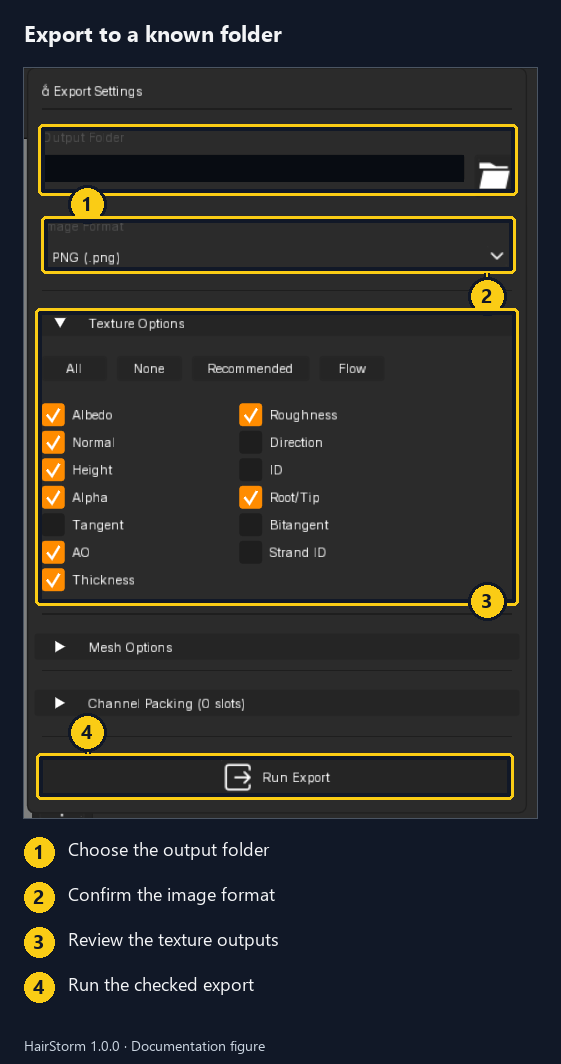
Choose the folder, image format, and outputs before running the export.

Selectable Texture MapsGroom Cards & Flat UV CardsOptional RGBA PackingMesh Format & UnitsFBX, OBJ & GLB Meshes

Open Export Settings, set Output Folder and Image Format, then review the checked maps under Texture Options. Choose only the maps your material needs; the selection shown is an example, not a required preset.

For mesh output, expand Mesh Options and choose Groom Cards, Cards UV, or Hair Strands. Match the format and units to your destination, add Channel Packing slots if needed, then click Run Export. Leave meshes off for a texture-only export.

In practiceKeep the selected textures and meshes together, then check them in your destination application.
Export Settings showing a redacted Output Folder, PNG image format, selected texture outputs, and Run Export.
Export Settings · Folder, image format, selected maps, then Run Export
Style the source

11 editable strand modifiers.

Stack, reorder, or disable modifier slots at any time. Modifiers evaluate in real time without overwriting underlying strand curves.

Noise

Variation

Break up an overly even bundle with irregular movement.

Curl

Curls

Shape rounded curls and coils.

Clump

Locks

Gather individual hairs into readable locks.

Taper

Tips

Narrow the strand ends while keeping the body readable.

Frizz

Fine detail

Add small, uneven detail around the main shape.

Gravity

Droop

Add a downward droop to the source hair.

Bend

Sweep

Give a source bundle a broad directional bend.

Braid

Plait

Create a braided pattern in the source hair before baking.

Trim

Length

Shorten the source hairs and vary their ends.

Smooth

Soften

Soften abrupt changes in the strand paths.

Wave

Waves

Add repeated side-to-side movement, from broad waves to tighter patterns.

Choose the maps you need

13 hair texture maps.

Bake up to 2K on Free or 4K on paid plans, then refine the maps with editable filters.

Albedo

Color

The hair color without the viewport lighting.

Normal

Surface detail

Add the appearance of individual strand detail to a card.

Direction Flow

Hair flow

Describe the flow for materials that support directional hair highlights.

Roughness

Shine

Control how sharp or soft the highlights appear.

Height / Depth

Depth

Describe relative depth within the source bundle.

Alpha Mask

Transparency

Hide empty areas between hairs. Texture edge padding does not grow this outline.

Root-to-Tip

Along the hair

Distinguish roots from tips for color treatments along the hair.

Ambient Occlusion

Shading

Add darker areas where source hairs sit close together.

Strand ID

Variation

Distinguish individual hairs for materials that vary their appearance.

Group ID

Groups

Separate assigned root groups for materials that vary their appearance.

Tangent

Direction

An additional hair-direction map for materials that ask for it.

Bitangent

Direction

An additional direction map for materials that specifically use it.

Thickness

Thickness

Describe hair thickness for materials that use it.

3D Grooming Suite

12 Dedicated scalp grooming tools & 3D sculpting brushes.

Draw on the head, adjust individual cards, and refine larger regions with brushes.

Geometric Styling & Manipulation Tools

Draw Strips (B)

Click and drag conformed hair card strips directly across the character scalp surface.

Select & Transform (Q)

Select cards for editing. Drag root handle to move; Shift+drag root to duplicate; Ctrl+drag to lock tangent orientation.

Redraw Strip (R)

Re-stroke an existing card spine to adjust its path while automatically preserving width settings.

Twist Profile (T)

Turn a card along its length and check how it reads from different angles.

Width Size (W)

Adjust width at the root, body, and tip.

Width Bend Angle (E)

Curve a card across its width rather than leaving it flat.

Interactive 3D Sculpting & Loft Generator

Loft Draw Strips (L)

Dual-rail guide tool generating conformed ribbons or multi-row procedural fade haircuts with live X-symmetry.

Comb Brush (C)

Gently comb card clusters in 3D viewport space to guide hairstyle flow and directional rhythm.

Smooth Brush (S)

Soften abrupt changes in the card curves.

Move Brush (M)

Push or pull a region of the hairstyle to adjust its shape.

Clump Brush (K)

Pinch neighbouring card strips into cohesive bundles for realistic locks and layered sections.

Cut Brush (X)

Trim card lengths in 3D space with an interactive clipping blade to shape bangs and ends.

Symmetry, Repetition & Card Shapes

Live X-Symmetry Mode (Y)

Draw mirrored counterparts on both sides of a centered head.

Mirror Selected Cards

Create mirrored copies of existing cards across the center of the head.

Fill Gap (Shift+G)

Add cards between selected boundary cards. Start with a small count and inspect the result.

Procedural 3D Braids

Choose Braid (3-Strand), Braid (2-Strand), or Four-Strand Braid geometry, then adjust cycles, spacing, and strand radius.

Card Hotbox (Space)

Open a menu near the pointer for tools and common grooming actions.

Isolate & Hide (Shift+I / Shift+H)

Review selected cards on their own or temporarily hide a dense section.

Export Compatibility

Built for your production DCC & game engine.

Choose a mesh format and units, export the maps, and check the first import before the final handoff.

Unreal Engine 5

FBX / OBJ
Scale Units: Centimeters (cm)

Export the placed groom and maps, then check size, transparency, and texture placement. The user guide covers a basic first material.

Blender

FBX / OBJ / GLB
Scale Units: Meters (m)

Import flat cards or a placed groom. Check the available UV layouts and build a material from the exported images.

Unity (URP / HDRP)

FBX
Scale Units: Meters (m)

Choose texture maps and channel packing to match the material used by your project. Material and character setup happen in Unity.

Godot 4

GLB / OBJ
Scale Units: Meters (m)

Exchange mesh and image files, then configure transparency and the final material in Godot.

Plan Entitlements

Which workspaces your plan unlocks.

The lifetime Free Tier includes strand creation, all 11 modifiers, and texture baking up to 2K. Personal unlocks the UV Layout workspace, flat-card and strand-mesh export, and 4K bakes. Professional and Studio unlock the complete 3D Scalp Grooming workspace with all 12 tools and brushes.

Start Authoring

Experience the complete hair card pipeline.

Download the Free Tier or choose a license plan for full UV cards and 3D grooming.